Apple Vision Pro: What It Really Feels Like to Use It Daily
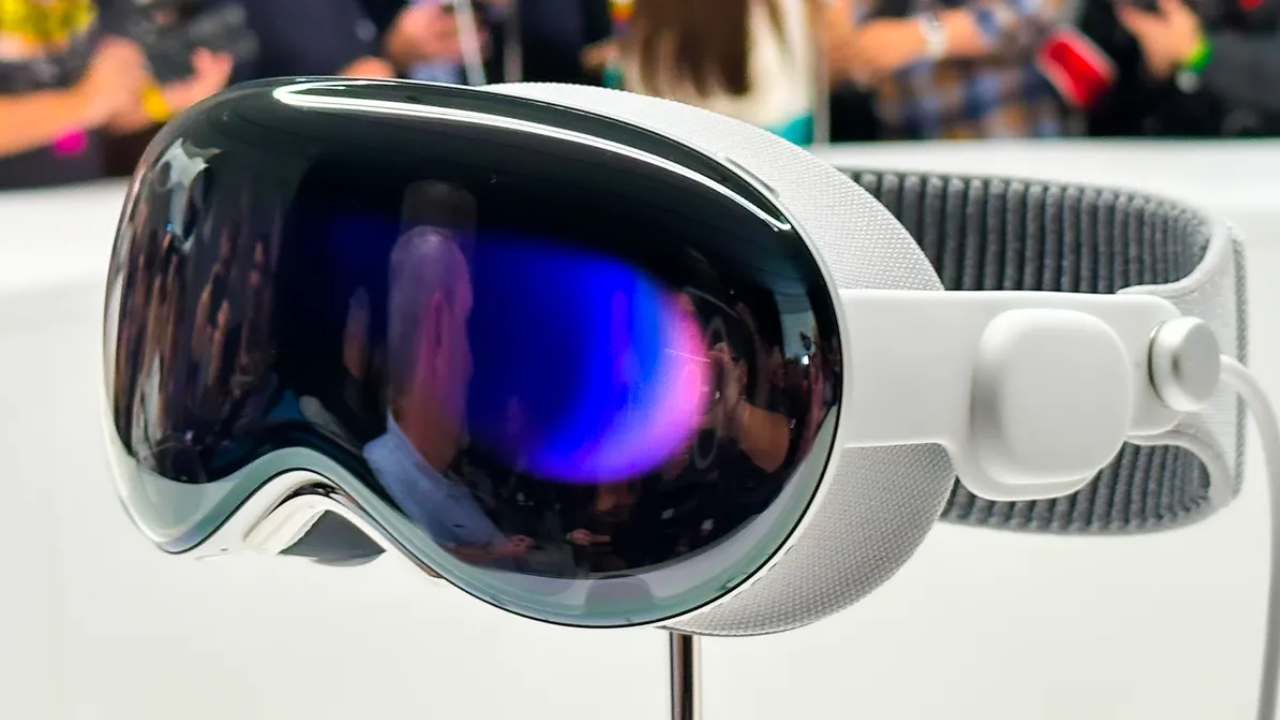
When Apple officially launched the Vision Pro, the tech world was flooded with excitement, curiosity, and a lot of bold claims. Billed as a “spatial computer,” Apple promised the Vision Pro would blend the digital and physical worlds in a seamless, intuitive way. But hype aside, what does it actually feel like to use the Apple Vision Pro daily?
In this honest and comprehensive breakdown, we go beyond the spec sheets and features — we explore the real-life, everyday experience of living with Apple’s most ambitious product to date.
First Impressions: The Learning Curve
On day one, unboxing the Vision Pro feels like stepping into the future. The materials are sleek. The design feels premium. The initial setup is surprisingly smooth — scan your eyes, fit the band, and you’re in.
But here’s the truth: it takes time to adjust.
- Eye-tracking is impressive but may feel sensitive at first
- Gestural controls are intuitive, but require muscle memory
- Moving from traditional screens to floating windows takes some rewiring of how you think about space
By day three, the novelty starts to fade, and you begin to actually use it like a tool — not just a toy.
The Daily Routine: Replacing the Laptop?
One of Apple’s promises with Vision Pro is that it could replace your laptop, at least for some tasks. And depending on your use case, this can be surprisingly true.
Browsing and Productivity
Using Safari on Vision Pro is fluid. You can:
- Open multiple tabs in spatial windows
- Pin apps around your room like a digital workstation
- Dictate or use a Bluetooth keyboard for longer typing sessions
Still, if you’re a heavy multitasker, the lack of tactile feedback may slow you down. It’s excellent for focused work, but not ideal for power Excel users or those needing multiple monitors in rapid motion.
Media and Entertainment: A Game-Changer
This is where Vision Pro truly shines.
Watching Movies and Series
- The visual fidelity is stunning — it feels like having your own private IMAX theater
- Spatial audio is rich and immersive, especially when watching Apple TV content
- Dark rooms enhance the experience, but even daylight doesn’t ruin it
You can watch content on a virtual screen the size of a wall — without a single pixel breaking immersion.
YouTube and Streaming
As of mid-2025, YouTube still hasn’t released an official app. But web playback works well. Netflix’s web player is stable too. Expect higher optimization as these platforms catch up.
FaceTime and Communication
The Persona feature is Apple’s answer to appearing on calls while wearing a headset. It creates a digital version of your face, which looks… passable. Not lifelike, but not cartoonish either.
In a daily workflow, FaceTime calls are smoother than expected:
- Sound quality is crisp
- You can walk around during meetings
- The window follows you if you want it to
But the awkwardness of wearing a headset during long meetings is still a factor. For some, it breaks the natural social dynamic of eye contact and body language.
Fitness and Physical Use
Unlike devices like Oculus Quest, Apple Vision Pro isn’t marketed as a fitness headset. And rightfully so.
- It’s too heavy for workouts
- Movement tracking is limited
- You won’t want to sweat in this device
However, for meditation apps, yoga guidance, and wellness breathing sessions, Vision Pro offers a calm, focused experience — enhanced by visual effects and ambient soundscapes.
Comfort and Wearability: Can You Use It for Hours?
One of the most asked questions about Vision Pro is: Can you really wear it all day?
The answer: not comfortably for everyone.
Factors to Consider
- The headset weighs just under a pound, and after an hour or so, you’ll feel it
- The headband helps balance weight, but pressure on the cheeks and nose can build
- Wearing glasses? You’ll need to invest in additional ZEISS lenses
Apple offers a dual strap and adjustable fit, but even then, this isn’t a device most people will wear for more than 2-3 hours at a time without breaks.
Battery Life in Practice
Apple claims around 2 hours of continuous use on battery — and that’s mostly accurate. However, with lighter tasks like note-taking, it may stretch slightly longer.
For true daily use, you’ll likely:
- Keep the external battery in your pocket
- Sit near an outlet
- Use plugged-in mode when at your desk
The tethered battery is a smart solution, but it limits movement. This is one area where a second-generation model will need to innovate.
The App Ecosystem: Still Growing
As of 2025, the number of apps optimized for Vision Pro is growing, but still limited compared to iPhone or iPad.
Most useful apps include:
- Freeform for whiteboarding and brainstorming
- MindNode for spatial mind mapping
- Microsoft Word and Excel (via web) for productivity
- Disney+ and Apple TV for immersive viewing
Still missing are many third-party productivity tools and creative apps. Until those developers optimize their experiences, Vision Pro feels slightly confined for power users.
Social Dynamics: The Isolation Factor
Using Vision Pro daily in a shared space can be awkward. You’re visibly detached from others. Even with the external EyeSight display showing your digital eyes, it doesn’t fully replicate human interaction.
Daily users report:
- Feeling disconnected during family time
- Difficulty switching between real and digital tasks
- Having to explain what you’re doing constantly
In professional settings, it’s gaining traction. In homes, it may still feel like a barrier to natural human connection.
Privacy and Security
Apple integrates Vision Pro into the same secure ecosystem as its other devices.
- Eye-tracking data is processed on-device
- App permissions are granular and transparent
- No external cameras feed real-time video unless approved
For most users, it feels safe and private — more so than other AR/VR headsets on the market.
Is Apple Vision Pro Ready for Everyday Use?
In short — yes, but with limitations.
Daily users often fall into one of three camps:
- Content Consumers: People using Vision Pro to watch media, relax, and explore immersive content. For them, it’s nearly perfect.
- Productivity Enthusiasts: Users looking to replace their laptop. It’s close, but still not ideal for multi-window, keyboard-heavy workflows.
- Early Adopters: People passionate about new tech who enjoy the novelty and are okay with the current limitations.
Final Thoughts
Using the Apple Vision Pro daily is like stepping into the future — but with your feet still planted in reality. It’s not yet the all-day, everywhere headset Apple might someday envision, but it’s already a powerful tool for entertainment, light productivity, and immersive exploration.
For those willing to accept its current boundaries, it delivers a unique and futuristic experience that no other device can offer today.